
Communities: a home for your regular group, club or court
In short
A Flobit community is a group of players who keep playing together. It has a group chat, roles for owners, admins and organizers, member standings and a top-players podium, and it hosts your tournaments. Make it public so nearby players can find it, or private so people ask to join. You can own up to three communities.
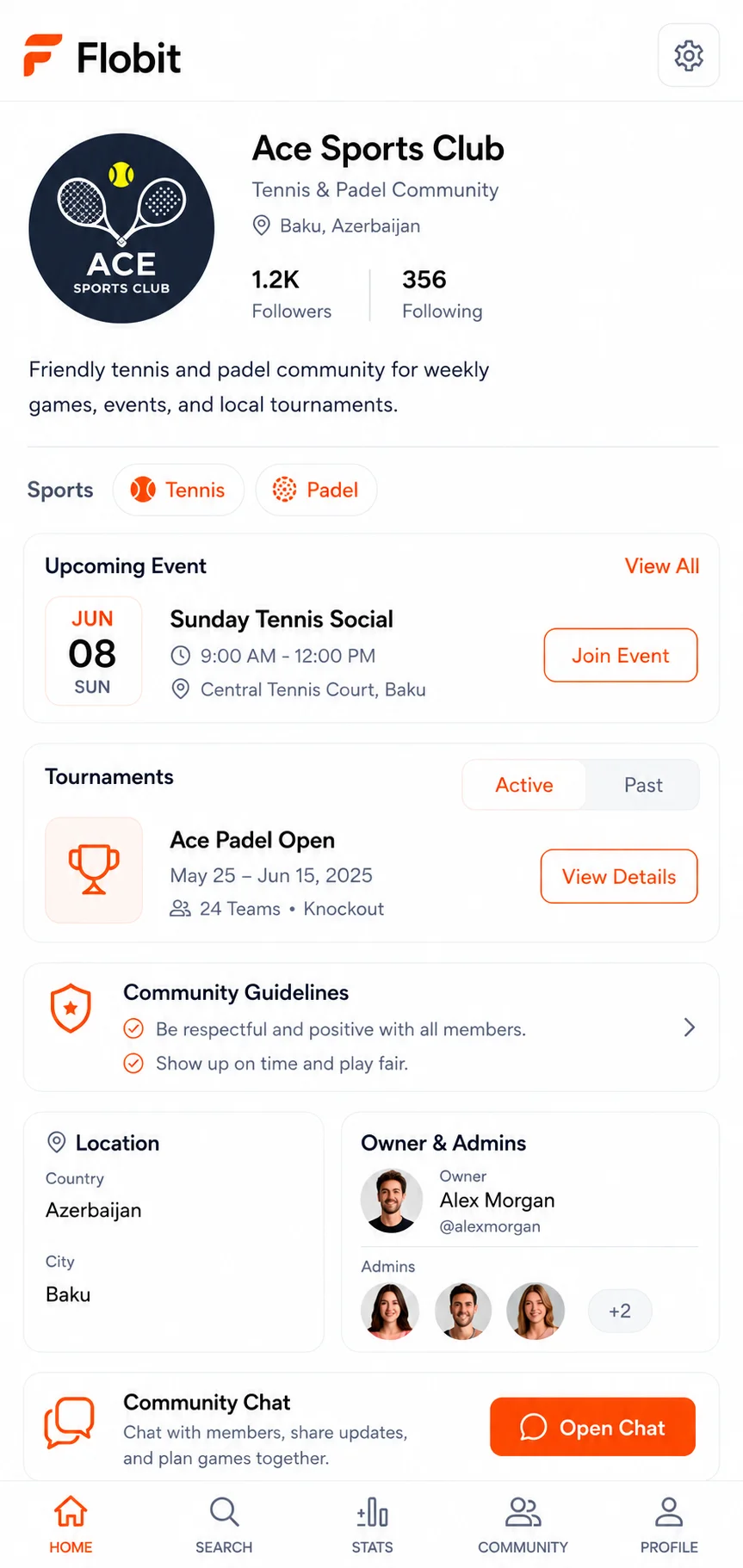
What is a community on Flobit?
A community is your group of players, the ones you keep organizing for. You give it a name, a short description (up to 300 characters), a city, and at least one sport. It can cover more than one sport, so a club that plays padel and tennis can live in one place.
Members chat in it, see how they rank against each other, and enter its tournaments. Every tournament on Flobit runs inside a community, so the players, the results and the history stay together instead of starting from zero each time. Build one you will come back to, not one per event.
If you are new to organizing, the pickup games guide covers the habits that keep a group going, and a community gives you the tools to apply them.
Can I make a community invite-only?
Yes. When you create a community you choose public or private.
- Public. Nearby players can find it by sport and location and join straight away.
- Private. Players ask to join, and an owner or admin approves each request. Until they are approved, they can't enter the community's tournaments.
You can also invite people yourself, and an owner or admin can remove a member. A community can be paused (deactivated) and brought back later, and a paused community can't host a tournament while it is paused. If you want to hand it over, an owner can transfer ownership to another member, and an owner who wants to leave has to do that first. Public communities appear in search and in the communities near you, with their sports and city, so a good description helps the right players find you.
What can owners, admins and organizers do?
Four roles share the work, so one person doesn't have to run everything.
| Role | What they can do |
|---|---|
| Owner | Everything an admin can do, plus appoint admins and hand the community over. There is one owner |
| Admin | Approve join requests, edit the community and its sports, give members the organizer role, remove members, pause or delete it |
| Organizer | Start and run tournaments for the community |
| Member | Chat, play, climb the standings and enter tournaments |
Roles are about who runs things; everyone in the community can see the chat and the standings. An organizer is a good fit for the person who runs the Thursday tournament but shouldn't be able to remove members or change settings.
Each person can own up to three communities. If you are at the limit, hand one to another owner or delete one before you start another.
Is there a group chat?
Yes. Every community has a chat for its members. You can send text, mention people, reply to a message, and attach a tournament as a card so everyone can open it in one tap. Community chat has no emoji reactions; those are in direct messages and tournament broadcasts. Join a community to chat with its members.
It is a chat for organizing games, not a photo or voice-note service: you can't send photos, voice messages or video, and messages are not end-to-end encrypted. Use WhatsApp or another app for those, and keep Flobit for the part that needs results and sign-ups.
Open the chat from the community page, or from your messages, where community chats sit next to direct messages. A tournament has its own broadcast room for announcements, so a busy event doesn't bury your everyday chat.
How do member standings and the top-players podium work?
Standings rank members by their record in confirmed matches against each other. Only matches between current members count, casual or tournament. A win is worth 3 points and a draw 1. You can look at all sports together or filter by one sport.
The community page shows the top three players on a podium, with a link to the full list. The board fills up as members play each other, so a new community starts empty and fills up as results are confirmed. Play someone from the community, and tap any player in the list to open their profile. It is a ranking inside your group, not a city or national ranking: Flobit has no city, national or global rankings.
Individual ratings are separate and follow each player across every community.
Can I run a weekly league in my community?
Yes. Owners, admins and organizers can start a tournament in the community, and it can be a league where everyone plays everyone once or twice, with a table. See running a tournament for the formats and setup.
- Members only. Players need to be members of the community to register for its tournaments.
- Up to 5 at once. A community can have 5 tournaments active at the same time. Finish or cancel one before you start another.
- A tournament leaderboard. Community tournaments feed a leaderboard that scores 3 points for a win, 1 for a draw and 0 for a loss.
- Past and upcoming. The community page lists tournaments as active, upcoming and past.
For a casual weekly night with no bracket, members can post open matches or use Quick Match.
Communities or a WhatsApp group?
Use both if you like: WhatsApp for pictures and banter, a Flobit community for the games themselves. Here is how they differ.
| WhatsApp group | Flobit community | |
|---|---|---|
| Chat | Text, photos, videos, voice notes and calls | Text, mentions, replies and shared cards. No photos, voice or video |
| Privacy of messages | Personal messages are end-to-end encrypted | Messages are not end-to-end encrypted |
| Who is on it | Almost everyone already has the app | Members need Flobit on iPhone or the web app |
| Organizing games | Sign-ups scroll away in the chat | Open matches, tournaments, approvals and waitlists |
| Results | You keep them yourself | Confirmed scores, member standings and a podium |
| Finding new players | By invite link | Public communities are found by sport and location |
If your group is happy with its chat, the simplest start is to keep it and add a community for the structure.
Frequently asked questions
Is a community free?
Yes. Creating and joining communities is free, like the rest of Flobit, with no ads and no subscription. One account can own up to three communities, and joining other people's communities doesn't count toward that limit.
Can I make a community invite-only?
Yes. Choose private when you create it. Players then ask to join and an owner or admin approves each request. You can also invite people directly. Public communities, by contrast, can be found by sport and location and joined straight away.
Can I run a weekly league in my community?
Yes. An owner, admin or organizer can start a league tournament inside the community, where everyone plays everyone once or twice and the table decides. A community can have up to five tournaments active at once, and members register for them in the app.
Who can start a tournament in a community?
Owners, admins and organizers. Regular members can enter tournaments and play in them, but they can't start one. A paused community can't host a tournament until an owner or admin reactivates it, and a community can only have five active tournaments at a time.
How many communities can I own?
Up to three. If you are at the limit, hand one over to another owner or delete one before you start another. Joining other people's communities doesn't count toward the limit.
Can I send photos in a community chat?
No. Community chat carries text, mentions, replies and shared cards, and direct messages add reactions, but neither carries photos, voice messages or video. Messages are also not end-to-end encrypted, so keep sensitive things to an app built for them.
Sources
Play more. Get better.
Free on iPhone and on the web. No ads, no subscription.
Already have an account? Sign in