
Quick Match: start a game in seconds with a code or QR
In short
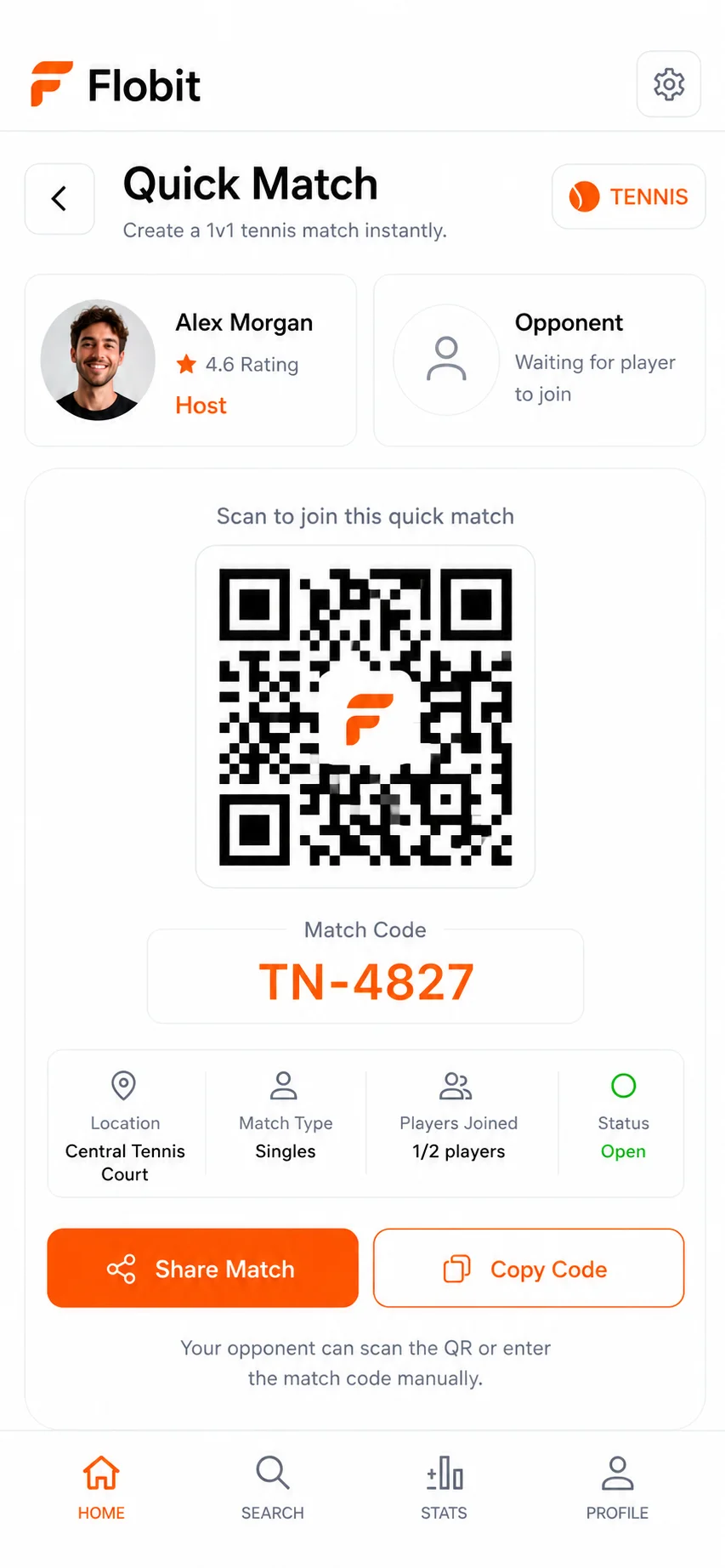
Quick Match is a lobby for a game you have already arranged. Pick a sport, create the lobby, and share its 8-character code, QR code or flobit.app/join link. Friends join as players or as the referee, anyone without Flobit can play as a guest, and the score is kept live. It doesn't find opponents for you.
How do I start a match with friends?
Create a lobby, share it, and start when your side is ready. You need Flobit on your iPhone and the sport added to your profile. Here is the whole path:
- Open Quick Match from the + button and choose a sport.
- Choose the format. Pick singles, doubles or a team format, the scoring rules, and whether to play now or later. A venue is optional; if you allow location, Flobit can suggest courts close to you for that sport.
- Create the lobby. Flobit gives you an 8-character code, a QR code and a flobit.app/join link.
- Share it. Friends type the code, scan the QR code in the app or open the link. The code never uses the letters I and O or the digits 0 and 1, so it is hard to misread when you say it out loud.
- Let people take their places. Each person joins as a player or as the referee. In doubles, players pick a side.
- Start the match. A short toss screen decides who serves or kicks off first (you can skip it), and then you keep score live.
Can friends join without a Flobit account?
Yes, as guests. Anyone with a Flobit account joins with the code, QR code or link. A friend who has not installed the app can still play: the host adds them by first and last name. A guest has no account, no profile and no rating, and their name appears in the match details only.
Guests still count in the rating math. When a real player faces a guest, the guest is treated as a player rated 1000, so the match can be rated for everyone who does have an account.
Joining as the referee is for the person who wants to keep score without playing. The referee doesn't sit on a side. They start the match and record the points, and the players check and confirm the score at the end. When a referee kept the score, one player's confirmation is enough to lock it in. If everyone playing is a guest, the referee's confirmation locks it in.
Which sports and formats can I play in Quick Match?
Quick Match works for all eight live sports, each with its own scoring rules. Badminton is coming soon.
| Sport | Formats you can pick |
|---|---|
| Padel | Singles or doubles; best of 3 or 5; golden point (default) or advantage; full final set or super tiebreak |
| Tennis | Singles or doubles; best of 3 or 5; pro set to 8 (singles only, tiebreak at 8–8); advantage or no-ad; full final set or super tiebreak |
| Table tennis | Best of 3, 5 or 7 games to 11, win by 2 (doubles: best of 5 only) |
| Basketball | Casual 3x3 and 5v5 |
| Volleyball | Indoor 6v6, best of 5 or 3 sets (to 25, decider to 15) |
| Football | 5-, 7- and 11-a-side |
| Ultimate frisbee | 7-a-side to 15, or 5-a-side to 13 |
| eFootball | Online 1v1, final score only, with no venue |
In team formats such as 5v5 basketball or 6v6 volleyball you don't need a registered team. The host starts the lobby, and players join a side one by one until the seats are full. The padel scoring guide explains the golden point and super tiebreak options.
Should I play now or play later?
Choose Play now when everyone is already together at the court: the lobby opens at once, you share the code or QR and start when the sides are ready. Choose Play later when you are arranging next Saturday: set the date and time, share the code in your group chat, and the match shows up in your calendar in the app.
Both options use the same code, QR code and link, and you can share them again at any time after the lobby is created. If a Play later match is never started, Flobit cancels it automatically 12 hours after its start time, so old lobbies don't pile up. You can also cancel it yourself before it starts.
You can be in one live match at a time. Finish or cancel the current one before you create or join another.
What happens when the match ends?
The score gets confirmed, ratings update and everyone can rate each other's sportsmanship. One player confirming the final score locks it in, and a result nobody confirms locks itself in after a day. Live scoring explains confirmations and disputes in full.
- Rating. A confirmed result moves each player's rating in that sport. A disputed result takes those changes back.
- Sportsmanship. You can give each opponent 1 to 5 stars for turning up, fair play and good spirit, and change it for 48 hours.
- Rematch. The player who set the match up gets a "Confirm and rematch" button as they confirm the score. It seats the same players again in a new lobby. Anyone you have blocked, or who no longer plays the sport, is left out.
Quick Match or open match: which should I use?
Use Quick Match when you already know who is playing. Use an open match when you need to find players. Flobit doesn't pair you with opponents automatically, so a Quick Match lobby only ever holds people you invited.
| Quick Match | Open match | |
|---|---|---|
| Best for | Friends, your regular group, a club night | Finding a fourth, a hitting partner or an opponent nearby |
| How people join | Code, QR code or link | They find the listing and ask to join |
| Who decides | Whoever has the code can join | The host approves each request |
| Guests without an account | Yes, added by name | No. Guests are for Quick Match and tournaments |
| When it happens | Now or later | Later, with a time and a place |
You can use both: an open match to find a fourth player, and a Quick Match each week once the group is settled.
Frequently asked questions
Is Quick Match free?
Yes. Quick Match is free, like the rest of Flobit, with no ads and no subscription. You need the Flobit app on iPhone (iOS 17 or later) to create or join a lobby.
How many players can join a Quick Match?
As many as the format has seats: 2 for singles, 4 for doubles, and more for team formats such as 5v5 basketball or 6v6 volleyball. The referee doesn't take a seat. Guests added by name fill seats like any other player.
Can someone just keep score as referee?
Yes. They join the lobby as the referee instead of a player. The referee doesn't play on a side, starts the match and records the points, and the players confirm the final score.
Can I set up a Quick Match for later?
Yes. Choose Play later, set the date and time, and share the code ahead of time. If a Play later match is never started, it is cancelled automatically 12 hours after its start time.
Does Flobit match me with opponents automatically?
No. Quick Match is for people you already know. To find players you don't know yet, post an open match: players nearby ask to join and you approve who plays.
Do my friends need the app to play?
To join with the code, QR code or link, yes, they need a free Flobit account. A friend who doesn't want one can still play: add them as a guest by name and they appear in the match without an account.
What if I type the code wrong?
Codes are exactly 8 characters and never contain I, O, 0 or 1, so the most common mix-ups can't happen. Flobit also ignores spaces and dashes if you paste a code. If it still fails, ask for the QR code or link instead.
Sources
Play more. Get better.
Free on iPhone and on the web. No ads, no subscription.
Already have an account? Sign in